


Introduction: Why Online Privacy Is No Longer Optional
Not too long ago, worrying about online privacy felt like something only tech geeks and conspiracy theorists did. The average person figured they had nothing to hide, so they had nothing to fear. In 2026, that thinking is dangerously outdated.
Every time you open a browser, dozens of invisible systems snap into motion. Advertisers track your clicks. Internet Service Providers log your activity. Data brokers package your habits and sell them to the highest bidder. Governments in many parts of the world monitor communications with little oversight. And cybercriminals sit waiting at every poorly secured connection, looking for any slip-up.
The good news? You can fight back. And you do not need to be a computer scientist to do it.
This guide is written for real people — people who want to reclaim control over their digital lives without getting lost in technical jargon. Whether you are a student, a journalist, a small business owner, or just someone who values their personal space, this is your complete roadmap to anonymous browsing in 2026.
Understanding What “Anonymous Browsing” Actually Means
The Myth of Incognito Mode
Let us start with the most common misconception in the world of online privacy. People think that turning on Incognito Mode or Private Browsing makes them invisible online. It does not.
Incognito mode does one useful but limited thing: it prevents your browser from saving your browsing history, cookies, and form data on your local device. That means someone picking up your laptop later will not see what you looked at. That is it. That is the full extent of what it does.
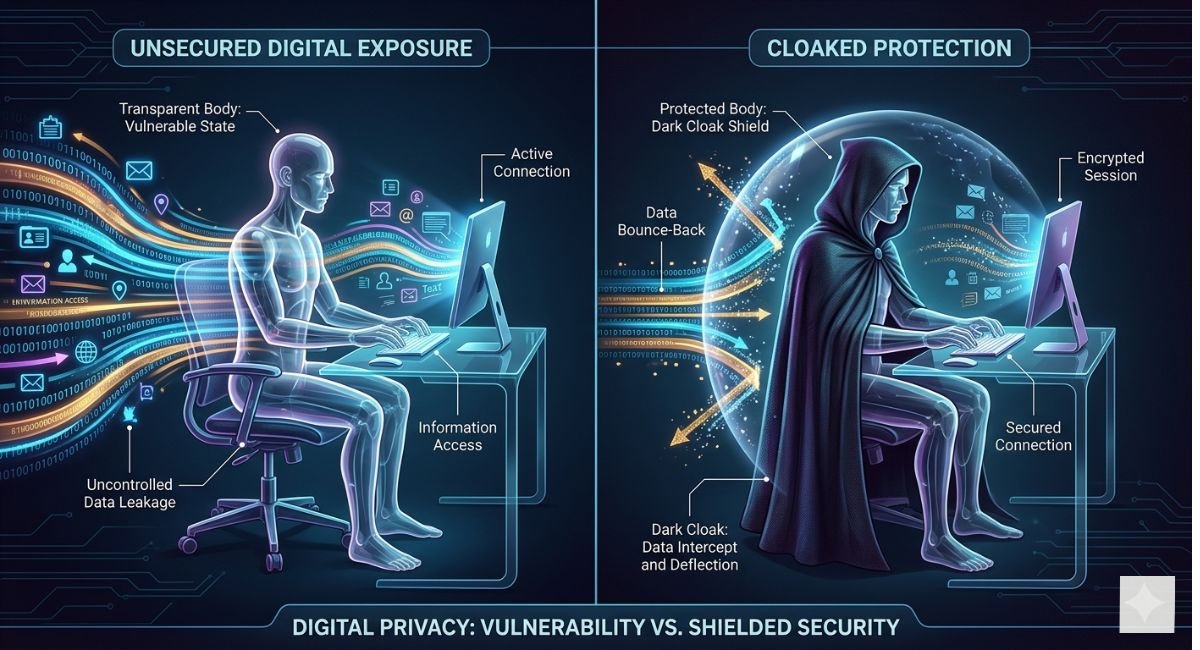
Your Internet Service Provider (ISP) can still see every website you visit. The websites you visit can still see your IP address and track you. Your employer, school, or whoever manages the network you are on can still monitor your traffic. Google, Microsoft, and other companies that run those browsers can still collect data on you.
Incognito is a curtain for your local device. It is not a cloak for the internet.
What True Anonymity Looks Like
Genuine online anonymity involves masking or obscuring your identity at multiple levels simultaneously:
Your IP address — the unique number that identifies your device and location on the internet. Every website you visit sees this.
Your browsing behavior — the pattern of sites you visit, how long you stay, what you click, and what you search for. Even without your name, this pattern can identify you.
Your device fingerprint — browsers silently share information about your device including your screen resolution, installed fonts, time zone, and browser version. This combination is often enough to uniquely identify you even without cookies.
Your DNS queries — when you type a website name, your device asks a server to translate it into an IP address. These queries are often unencrypted and fully visible to your ISP.
True anonymity means addressing all of these simultaneously. This guide will walk you through how.
The Core Tools for Anonymous Browsing
Virtual Private Networks (VPNs)
A VPN creates an encrypted tunnel between your device and a server operated by the VPN provider. All your internet traffic flows through that tunnel. From the outside, anyone monitoring your connection — your ISP, your government, a hacker on the same Wi-Fi network — sees only encrypted gibberish going to the VPN server. They cannot see which websites you are actually visiting.
On the other side, the websites you visit see the VPN server’s IP address, not yours. This effectively hides your real location.
What VPNs do well:
- Hide your browsing from your ISP
- Protect you on public Wi-Fi
- Let you access geo-restricted content
- Mask your real IP address from websites
What VPNs do not do:
- Make you completely anonymous (the VPN provider itself can see your traffic)
- Protect against browser fingerprinting
- Hide your identity from websites where you are logged in
Choosing a trustworthy VPN in 2026:
The VPN market is flooded with options, and frankly, many of them are untrustworthy. Some free VPNs actively log and sell your data — the opposite of what you want. When choosing a VPN, look for these qualities:
- A verified no-logs policy, ideally audited by an independent third party
- Headquarters in a privacy-friendly jurisdiction
- Open-source software where possible
- A track record of resisting government data requests
Reputable names that have stood the test of time include Mullvad, ProtonVPN, and IVPN. These are not sponsored recommendations — they are simply providers that consistently prioritize privacy over profit.
The Tor Network
If a VPN is a private tunnel, Tor is more like a maze. When you use the Tor Browser, your traffic is encrypted multiple times and routed through at least three volunteer-operated servers called nodes. Each node peels away one layer of encryption and passes the traffic along. No single node ever knows both who you are and where you are going.
This layered approach — which is why it is called The Onion Router — makes Tor significantly more resistant to surveillance than a VPN. Even if one node is compromised, your anonymity holds.
Tor is excellent for:
- Journalists communicating with sources
- Activists in countries with restrictive governments
- Researchers accessing sensitive information
- Anyone who needs strong anonymity above all else
The tradeoff with Tor: Tor is considerably slower than a regular browser or VPN because your traffic is bouncing through multiple servers. Streaming video is painful. Heavy downloads are impractical. But for text-based browsing, reading, and communication, it works reliably.
You access Tor through the Tor Browser, which is available free from the official Tor Project website. Do not download it from anywhere else.
Privacy-Focused Browsers
Your browser is the front door of your digital life. Most popular browsers — Chrome, Edge, and even Safari to some extent — are built by companies whose primary business is advertising. That creates an obvious conflict of interest when it comes to protecting your privacy.
Several browsers are designed from the ground up with privacy as the priority:
Brave builds automatic ad and tracker blocking right into the browser. It is fast, compatible with Chrome extensions, and requires almost no configuration to get meaningful privacy protection out of the box.
Firefox is not private by default, but it is open source and highly customizable. With the right settings and a handful of extensions, it becomes one of the most private browsers available. It also gives you far more control than Chrome ever would.
Tor Browser as mentioned above is Firefox-based, configured for maximum anonymity. Use it when privacy matters more than speed.
LibreWolf is a Firefox fork that comes pre-configured with aggressive privacy settings, removing telemetry and adding protections that you would otherwise need to configure yourself.
For most people, Brave as a daily driver and Tor Browser for sensitive tasks is a solid combination.
Private Search Engines
Google processes billions of searches every day and logs every single one of them, connecting each query to your account, your device, and your location. Even if you are not signed in, Google uses various fingerprinting techniques to link your searches to a profile.
Private search engines break this link. They do not track you, do not build profiles, and do not sell your search history.
DuckDuckGo is the most widely known. It pulls results from multiple sources and genuinely does not store identifying information about your searches. The interface is clean and the results are good for most everyday queries.
Startpage works differently — it fetches Google results on your behalf, stripping out the tracking, so you get Google-quality results without Google surveillance.
Brave Search is the search engine built by Brave, using an independent index rather than pulling from Google or Bing. It has matured significantly and is now a strong option for those who want full independence from big tech.
Kagi is a paid search engine that has gained a strong following for its result quality and zero-ad business model. Because you pay directly, there is no incentive to monetize your data.
Protecting Your Connection — Public Wi-Fi and Beyond
Public Wi-Fi at coffee shops, airports, hotels, and libraries is one of the most dangerous places for your data. These networks are typically unsecured, meaning anyone else on the same network can potentially intercept your traffic. This technique — called a man-in-the-middle attack — is not exotic. It is well within the capability of a motivated individual with basic tools and a free afternoon.
Always use a VPN on public Wi-Fi. This is non-negotiable. The VPN encrypts your traffic before it leaves your device, making interception useless.
Beyond VPNs, a few additional habits dramatically reduce your risk:
Check for HTTPS. Every website you visit should have HTTPS in the address bar, not just HTTP. The “S” means the connection between your browser and that site is encrypted. Modern browsers will warn you about sites that lack this, but it is worth understanding why it matters.
Turn off auto-connect. Most phones and laptops will automatically connect to networks they have joined before. This can be exploited by setting up a malicious network with the same name as a familiar one. Disable auto-connect for public networks.
Use a personal hotspot when possible. If you have unlimited mobile data, connecting through your phone’s hotspot is almost always safer than using public Wi-Fi.
Browser Fingerprinting — The Tracking Method Most People Miss
Even if you use a VPN and block cookies entirely, websites can still track you through a technique called browser fingerprinting. When your browser loads a page, it silently shares a surprising amount of information: your operating system, browser version, screen resolution, installed fonts, time zone, language settings, graphics hardware, and much more.
Individually, none of these facts uniquely identify you. Together, they often do. Studies have shown that browser fingerprints are unique for the vast majority of users, making them a highly effective tracking tool that no cookie is needed for.
How to fight back against fingerprinting:
The Tor Browser addresses this by making every user’s browser look identical — standardizing the fingerprint so no one stands out. This “blend in with the crowd” approach is the most effective defense.
Brave Browser includes fingerprinting protection that adds randomized noise to fingerprinting attempts, making it harder for trackers to get consistent data.
The Firefox extension CanvasBlocker specifically targets canvas fingerprinting, one of the more common techniques.
Avoiding exotic fonts, running standard screen resolutions, and keeping your browser updated all help reduce the uniqueness of your fingerprint, though they do not eliminate it entirely.
Email and Messaging Privacy
Anonymous browsing covers a lot of ground, but your email and messaging apps represent equally significant privacy risks. Here is what matters most.
Secure Email
Standard email — Gmail, Outlook, Yahoo — is readable by the companies running those services. Gmail famously scanned email content for advertising purposes for years. Even if they have scaled back that practice, your emails remain accessible to those providers and to law enforcement with a court order.
ProtonMail (now rebranded as Proton Mail) is the gold standard for encrypted email. It is end-to-end encrypted, meaning even Proton cannot read your messages. It is based in Switzerland and subject to strict Swiss privacy law.
Tutanota is another excellent encrypted email option with a strong privacy track record.
For temporary situations — signing up for a service without giving your real email — tools like SimpleLogin and AnonAddy let you create alias email addresses that forward to your real inbox without revealing it.
Secure Messaging
For private conversations, Signal remains the most trusted end-to-end encrypted messaging app available. It is open source, collects almost no metadata, and is recommended by security researchers worldwide. The Signal Protocol is now used inside WhatsApp as well, though WhatsApp collects considerably more metadata.
Telegram is not meaningfully private by default. Regular chats are not end-to-end encrypted. Only “Secret Chats” are, and Telegram’s closed-source server code cannot be independently verified.
DNS Leaks and How to Prevent Them
Here is something that surprises many people: even with a VPN running, your device might be leaking information about which websites you visit through unencrypted DNS queries.
DNS (Domain Name System) is the internet’s phone book. When you type “example.com,” your device asks a DNS server to look up the corresponding IP address. If this query is not encrypted and not routed through your VPN, your ISP can see every domain name you look up — even if the actual content of your browsing is encrypted.
To check whether you have a DNS leak: visit a site like DNSLeakTest.com with your VPN active. It will show you which DNS server your queries are going through. If it shows your ISP’s server, you have a leak.
Solutions:
Most reputable VPN clients handle this automatically by routing DNS queries through their own servers. Make sure your VPN has a DNS leak protection option and that it is enabled.
If you are not using a VPN, you can still improve DNS privacy by switching to an encrypted DNS service. NextDNS and Cloudflare’s 1.1.1.1 with WARP both offer DNS-over-HTTPS (DoH) or DNS-over-TLS (DoT), which encrypts your DNS queries and prevents your ISP from seeing which domains you are resolving.
Operating System and Device-Level Privacy
Your browser and VPN are only part of the picture. The operating system your device runs can also leak data in ways that bypass everything you do at the browser level.
Windows is notorious for telemetry — the data it sends back to Microsoft about your usage. Windows 11 in particular integrates advertising IDs, Cortana, and Microsoft account features that collect considerable data. You can disable much of this through settings, but some reporting persists no matter what you do.
macOS is somewhat better but still routes DNS, Spotlight searches, and Siri queries through Apple’s servers by default.
Linux is the privacy-conscious choice at the operating system level. Most Linux distributions collect no telemetry at all. For the most security-conscious users, Tails OS is a Linux distribution designed to run from a USB drive, leave no trace on the host computer, and route all traffic through Tor automatically. Whonix is another hardened option that runs inside a virtual machine.
For mobile devices, GrapheneOS is a privacy-focused Android distribution that removes Google services while maintaining strong security. It runs on Google Pixel hardware and is genuinely excellent for privacy-conscious smartphone users.
Smart Habits That Technology Alone Cannot Replace
No tool in the world protects you if your habits undermine it. Here are the behavioral practices that are just as important as any software.
Do not log into personal accounts while trying to browse anonymously. If you open a Tor Browser window and then log into your Google account, you have handed Google a direct link to everything you do in that session. Anonymous tools only work when your identity is not attached to your session.
Use different browsers for different purposes. Keep your anonymous browsing completely separate from your regular everyday browsing. Many privacy-focused users maintain three browser profiles: one for general non-sensitive tasks, one for anything they want kept private from trackers, and the Tor Browser for situations requiring stronger anonymity.
Think before you share. Privacy tools protect your metadata and your IP address, but they cannot protect information you voluntarily provide. The simplest data collection still happens because people fill out forms, create accounts, and share personal details without thinking.
Keep everything updated. Security vulnerabilities in browsers, operating systems, and apps are discovered regularly. Attackers exploit them. Updates patch them. Staying current is one of the most important and underrated security habits.
Use strong, unique passwords and a password manager. Password reuse is one of the most common ways accounts get compromised. A password manager like Bitwarden (open source and trustworthy) handles the complexity so you do not have to.
Legal Considerations — What Is and Is Not Permitted
In most democratic countries, using a VPN, the Tor Browser, private search engines, and encrypted messaging is completely legal. These are tools used daily by lawyers, journalists, corporations, human rights workers, and ordinary citizens with entirely legitimate purposes.
That said, a few important points:
Laws vary by country. Some nations restrict or ban VPN use, including China, Russia, Iran, and North Korea. If you are in or traveling to a country with restrictive internet laws, research the local situation carefully.
Anonymity tools do not make illegal activities legal. Using Tor does not grant you immunity for committing crimes. Law enforcement agencies have demonstrated they can still identify and prosecute individuals who use these tools while engaging in criminal behavior.
Your employer’s network is a different story. On a company-owned device or company network, your employer has the legal right to monitor your activity in most jurisdictions. Privacy tools work at the internet level but do not override the terms of your employment.
Building Your Personal Privacy Setup in 2026
Putting everything together does not have to be complicated. Here is a practical setup for three different levels of privacy need:
Baseline Privacy (Good for Most People)
Switch to Brave Browser as your daily driver. Install a reputable VPN like ProtonVPN or Mullvad and turn it on whenever you use public Wi-Fi and ideally at all times. Replace Google Search with DuckDuckGo or Brave Search. Switch from Gmail to Proton Mail for sensitive communications. Enable encrypted DNS through your VPN or a service like NextDNS.
This setup takes an afternoon to implement and dramatically reduces the amount of data being collected about you compared to typical browsing.
Intermediate Privacy (For the Privacy-Conscious)
Build on the baseline setup by switching to Firefox with a hardened configuration and extensions including uBlock Origin, Privacy Badger, and CanvasBlocker. Use a VPN with verified no-logs policy at all times. Set up email aliases through SimpleLogin for any services you sign up for. Use Signal for sensitive conversations. Review your phone’s privacy settings and revoke unnecessary app permissions.
High Privacy (For High-Risk Situations)
For journalists, activists, whistleblowers, or anyone in a situation where anonymity genuinely matters: use Tails OS run from a USB drive. Route everything through Tor. Use Proton Mail over Tor. Communicate exclusively through Signal. Never mix anonymous activities with any accounts or behaviors tied to your real identity. Consider a device purchased with cash that is never associated with your real name.
Conclusion: Privacy Is a Practice, Not a Product
Online privacy in 2026 is not something you can buy once and forget about. It is an ongoing practice — a set of tools, habits, and decisions that you revisit and refine over time.
The technology landscape shifts. New tracking techniques emerge. Laws change. Services that were trustworthy yesterday may not be tomorrow. Staying informed is part of the practice.
But here is the encouraging reality: you do not need to be perfect to be significantly better protected than you are right now. Even implementing a few of the measures in this guide — switching to a privacy browser, using a VPN, changing your search engine — puts you miles ahead of where most people are.
Your data belongs to you. Your browsing habits, your searches, your conversations — these are not products to be harvested and sold. Reclaiming that data is not paranoia. It is digital self-respect.
Start today. Start small. And keep going.